
Free Video Splitters Compared: Which Tool Fits Your Workflow?


Compare free video splitters: lossless desktop vs online tools. Find the best fit for quality, privacy and workflow.
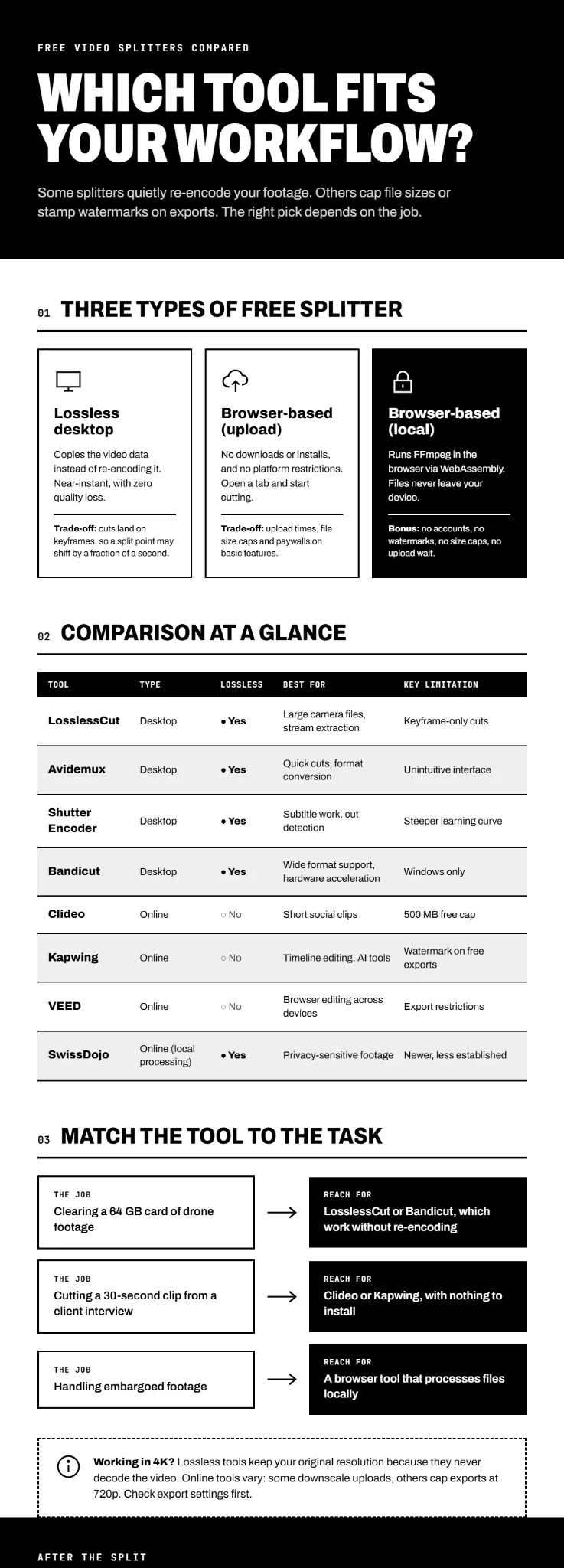
Splitting a video sounds simple until you try it. Some tools re-encode your footage and degrade the quality. Others cap file sizes, stamp watermarks on your exports, or force you through a browser upload that takes longer than the edit itself. Choosing well comes down to matching the tool to the job. Three distinct categories of free video splitters exist, and each suits a different kind of work.
Lossless Desktop Splitters: Speed Without Quality Loss
These tools cut video by copying the underlying data rather than decoding and re-encoding it. The result: near-instant processing and zero quality loss. The trade-off, however, is precision. Lossless cuts land on keyframes, not arbitrary frames, so your split point may change by a fraction of a second.
LosslessCut dominates this category. Built on FFmpeg, it handles almost every video and audio format, supports lossless merging, stream extraction, and subtitle embedding, and runs on Windows, macOS, and Linux. It also detects black scenes, silent audio, and scene changes automatically, then segments the timeline by length, size, or segment count. For GoPro, drone, or camera footage where you simply need to remove dead space, LosslessCut finishes the job before other editors have finished loading the file.
Avidemux takes a similar lossless approach but prioritises simplicity over feature depth. It cuts and joins videos without re-encoding, applies basic filters like resize and denoise, and supports batch processing through Python scripting. The interface can feel unintuitive, and complex edits belong in a proper editor, but for quick commercial removal or video format conversion, Avidemux gets the job done.
Shutter Encoder sits between the two. It handles lossless cutting but adds automatic cut detection, subtitle embedding, logo overlays, and colour adjustment across images and video. Avid itself recommends it as part of Media Composer and ProTools ingest workflows, which says something about its reliability.
Bandicut rounds out the desktop group with hardware-accelerated H.264 encoding and a broader format list than most competitors, covering everything from MP4 and MKV to RMVB and VP6. Its 2025 update added video rotation, flipping, and speed adjustment from 0.1x to 99.9x.
Browser-Based Splitters: Convenience Over Control
Online splitters trade processing power for accessibility. There are no downloads, no installations, no platform restrictions. The catch: upload times, file size caps, and subscription walls behind basic features.
Clideo allows free uploads up to 500 MB and supports AVI, MP4, MOV, and other common formats. Beyond splitting, it functions as a basic editor with text, music, and aspect ratio adjustments. The free tier works well for short social media clips, though longer footage hits the size ceiling quickly.
Kapwing offers a drag-and-drop timeline with frame-by-frame precision and keyboard shortcuts for splitting. Its AI tools automate subtitles, audio cleanup, and background removal, but those features sit behind a paywall. The free version exports with a watermark.
VEED runs entirely in the browser across desktop and mobile, supporting MP4, MOV, MPEG, MKV, and AVI. It targets small teams that need one editor for all video types, but the free tier limits export quality and stamps branding on output.
An alternative exists in browser-based tools that process files locally using WebAssembly and FFmpeg. SwissDojo and AI Toolbox Video Splitter both split videos without uploading anything to a server, eliminating privacy concerns and upload waits entirely. No accounts, watermarks nor size caps. And for anyone handling sensitive footage, local processing can be a game changer.
Matching the Tool to the Task
Different jobs demand different tools. A videographer clearing a 64 GB card of drone footage needs LosslessCut or Bandicut, something that rips through files without re-encoding. A social media manager cutting a 30-second clip from a client interview can use Clideo or Kapwing without installing anything. A media team handling embargoed footage should look at browser tools that process locally.
The resolution question matters, too. Lossless tools preserve original resolution because they never decode the video. Online tools vary wildly. Some downscale uploads, others cap exports at 720p. Check the export settings before committing to a browser editor for 4K work.
Comparison at a Glance
| Tool | Type | Lossless? | Best For | Key Limitation |
| LosslessCut | Desktop | Yes | Large camera files, stream extraction | Keyframe-only cuts |
| Avidemux | Desktop | Yes | Quick cuts, format conversion | Unintuitive interface |
| Shutter Encoder | Desktop | Yes | Subtitle work, cut detection | Steeper learning curve |
| Bandicut | Desktop | Yes | Wide format support, hardware acceleration | Windows only |
| Clideo | Online | No | Short social clips | 500 MB free cap |
| Kapwing | Online | No | Timeline editing, AI tools | Watermark on free exports |
| VEED | Online | No | Browser editing across devices | Export restrictions |
| SwissDojo | Online (local) | Yes | Privacy-sensitive footage | Newer, less established |
Why Asset Management Completes the Workflow
Splitting a video is rarely the final step. Those clips need names, versions, approvals, and a home. A campaign might produce twelve cuts from one source file, each destined for a different channel with different specs. Without a system to track them, version control collapses.
HIVO gives creative teams one place to store, version, and distribute every asset a project generates. When your video splitter produces twelve clips, HIVO keeps them organised and accessible. Explore how HIVO supports video workflows at Video Asset Management Software.

.svg)